Reference Error in JavaScript

The JavaScript ReferenceError occurs when a variable is referenced which does not exist or has not yet been initialized in the current scope.
Now there are a few types of ReferenceError that vary from each other.
Let's discuss them here.
What causes JavaScript ReferenceError?
The ReferenceError in JavaScript shows when we try to use an out-of-scope variable. In JavaScript, we have a few types of reference errors that vary from each other. Some of them are:
Undefined variables:- When we try to access a variable that is not defined causes a reference error in JavaScript.
Out-of-scope variables:- The variables which are inside a function scope can't be accessed outside of it. And if we try to access some variable outside of this scope causes a reference error.
Example of Reference Error:-
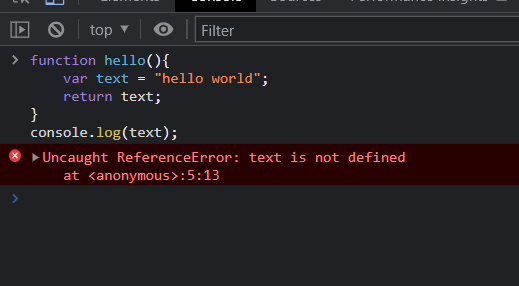
Below is an example of a JavaScript Reference Error thrown when referencing a variable that is out of scope.
function hello(){
    var text = "Hello world";
    return text;
}
console.log(text);
Here in the function hello() text is defined inside the scope of the function and we are trying to reference this outside the of the function so this results in giving a Reference Error.
How to fix Reference Error
Reference Errors in JavaScript are mainly thrown when we try to attempt to reference a variable that does not exist or is out of scope. So in the majority of cases, a reference Error can be fixed by making sure that the referenced variable is defined inside the scope where it is being called.
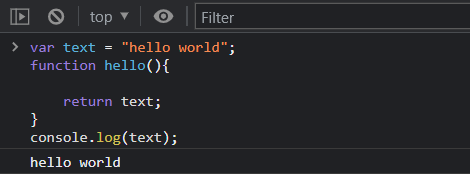
Now the above example can be corrected by moving the text variable outside of the function scope and since then the text variable would be in the global scope then the hello() being in the global scope can access the variable defined in the global scope.
 var text = "Hello world";
function hello(){
    return text;
}
console.log(text);
Output:-